What’s a Shaping Table?
Have you ever come across instructions like this in a knitting pattern?
Increase body every 2 rows 6 times, then every 3 rows 8 times, and at the same time, increase sleeve every 3 rows 4 times, then every 4 rows 6 times.
If your eyes glazed over, you’re not alone (mine did just writing that)!
“At the same time” is one of the most notorious phrases in knitting. Following instructions like these is like trying to simultaneously pat your head and rub your belly!
Here’s what’s actually going on:
In a sweater yoke, you are shaping body, sleeves, and neckline at the same time. If the sweater is well-graded, each of these parts will use a different rate of increase (top-down) or decrease (bottom-up).
Most patterns handle this with a dense paragraph of instructions. Mine handle it with a shaping table.
A shaping table lays out each of these shaping rates — body, sleeve, neckline — in a grid, so you can see exactly what is happening on each row. Instead of holding multiple rates in your head, you can simply look at a row and see:
Body increases → yes
Sleeve increases → yes
Neckline increases → no
And because these shaping rates are separate, they are independently controllable.
That separation is what makes it possible to adjust proportions more precisely, rather than being locked into a single fixed grading system.
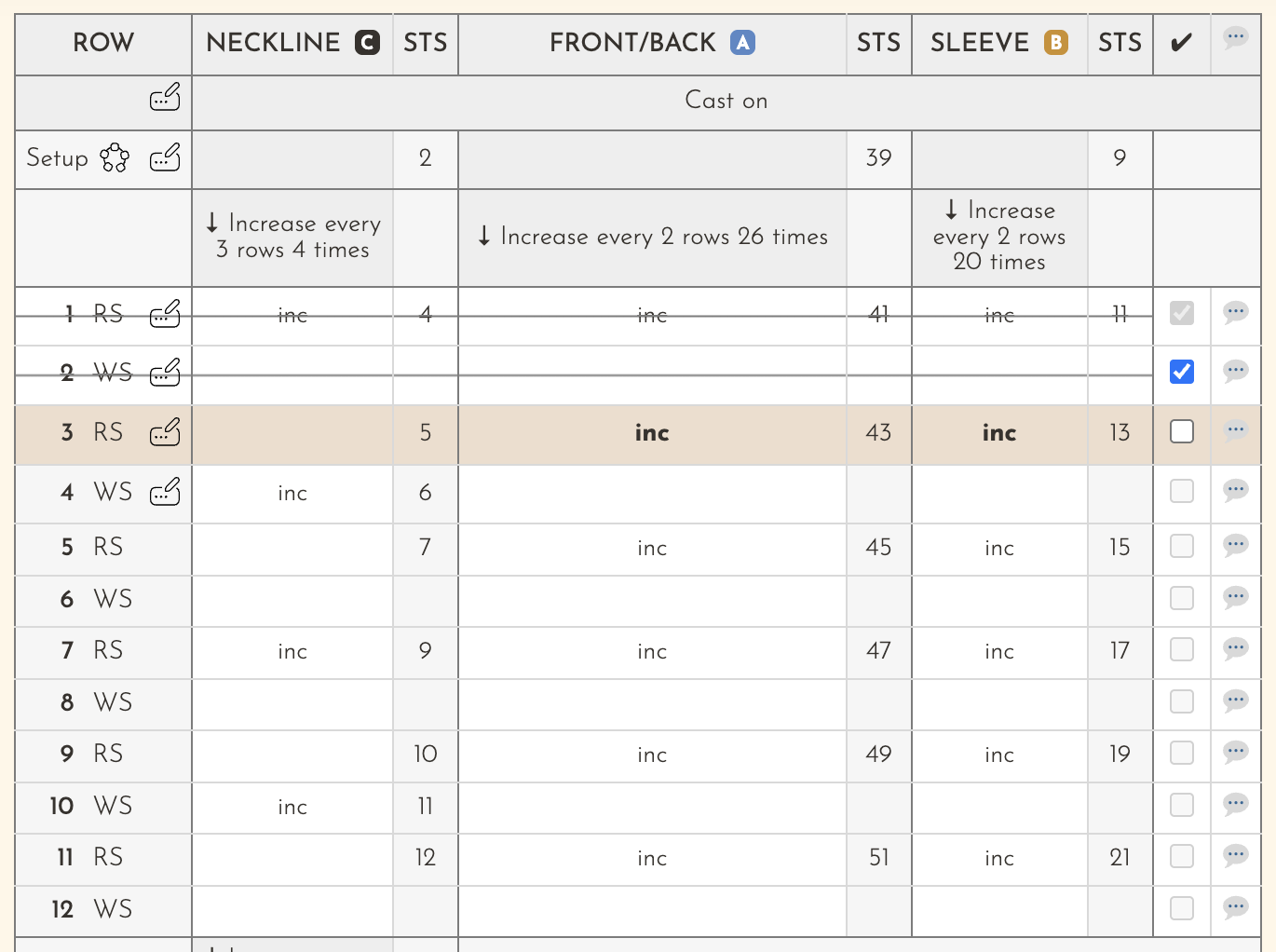
My shaping tables use your measurements to individually tailor each shaping rate to your exact proportions.
So you can knit from instructions that fit your body to begin with – without having to manually adjust or rewrite the pattern yourself!
How it works
Every customizable knitting pattern is made up of two parts: a pattern PDF and a custom shaping table. The PDF reads exactly like a regular knitting pattern, with step-by-step instructions, yarn requirements, a schematic, and all the parts that will make you feel at home.
Instead of following fixed shaping rates for certain sections of your sweater, like the shoulder shaping, the shaping table uses your measurements to produce custom instructions. It can be printed or used online.
The pattern PDF will guide you through the entire project, including when to refer to the shaping table.
- Enter your measurements. Fill in a short form with your body measurements.
- Get your custom shaping table. The shaping tables create custom knitting instructions tailored to your proportions — not a standard size.
- Knit a sweater that fits! Your pattern PDF looks like a regular knitting pattern. It tells you exactly when to refer to your shaping table, so you’re never wondering which to follow.
Some patterns have not been updated with the customizability feature yet. To hear when they are released with this feature, sign up to my newsletter!
Explore patterns with shaping tables